Collecting Cards
Topics covered on this page
Collecting cards with Omise.js
This article will help you build a form that lets you collect cards directly from a page on your website and tokenize them.
Omise.js allows you to collect card information easily. Omise.js is a client-side JavaScript library that lets you run your own HTML form in your customer's browser. It sends sensitive card data to the Omise server and receives a card token in exchange. Forward that token to your server for processing — your server never has to handle sensitive card information directly.
This guide focuses specifically on collecting and tokenizing card details. Omise.js also handles non-card payment methods (PromptPay, GrabPay, and other sources) and offers a pre-built payment widget as an alternative to a custom form — for either of those, see the general Omise.js reference.
The only supported way to send card data to Omise is via JavaScript using Omise.js, unless your organization holds a PCI-DSS license permitting server-side card data handling.
Requirement: Your checkout page must be served over HTTPS. Omise.js will not function on pages served over plain HTTP. Omise recommends enabling HTTPS across your entire site, not only the checkout page. (Source: docs.omise.co/omise-js)
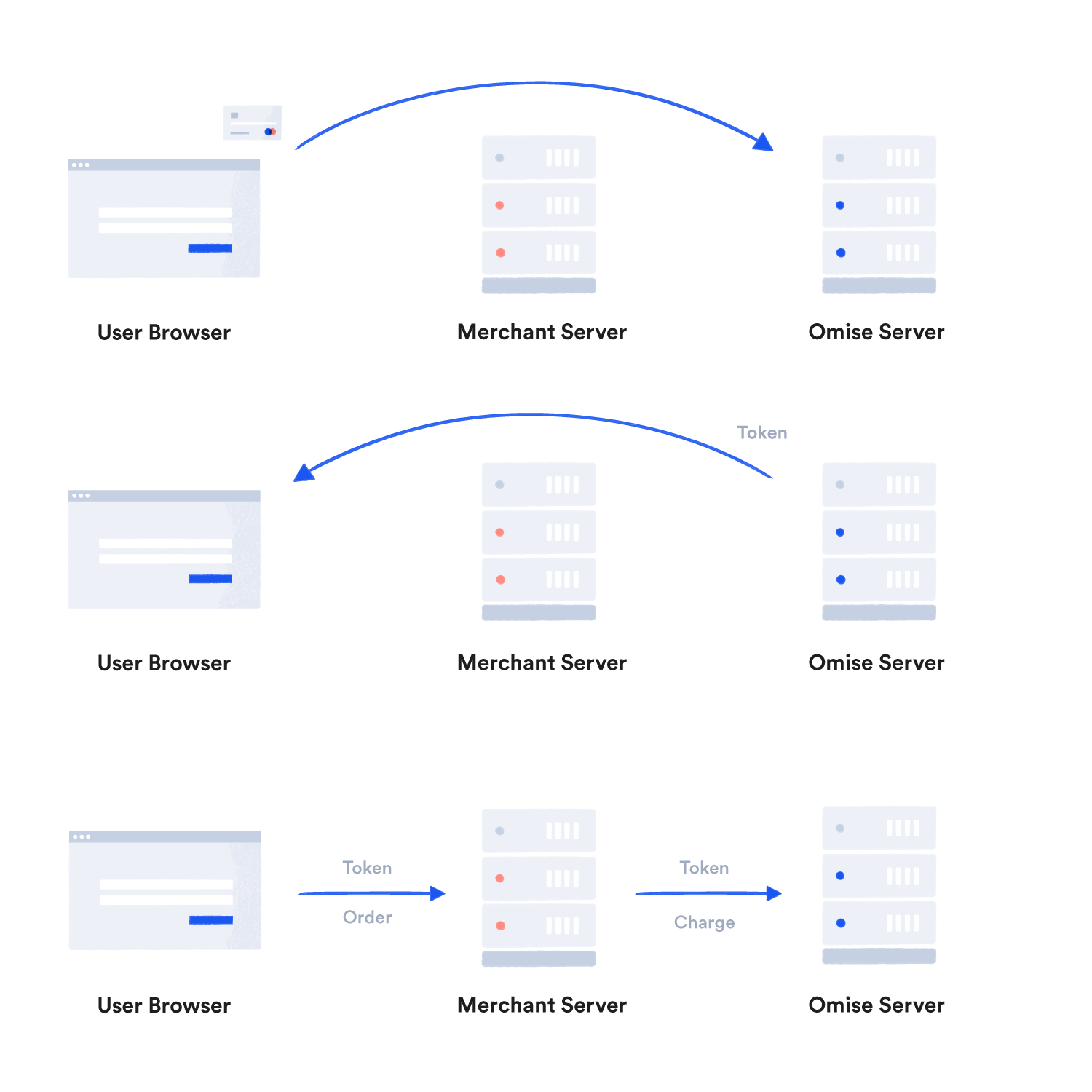
How it works
On a high level, this is how it works:
- Using Omise.js and your public key, send the cardholder data from your customer's browser to Omise.
- The Omise tokens service responds with a single-use card token.
- Forward the token back to your server.
- Use the token to take an action on the card. You can charge the card, save the card to a new customer, or attach the card to an existing one.
Omise recommends against storing the token. Since it is for one-time use only, there is no benefit in saving it for later — use it and discard it immediately.
Try it: Omise token simulator
You can learn more about the tokens API in the tokens reference.
A full-fledged example
First, insert Omise.js into your webpage. Add it before the closing </body> tag.
<script src="https://cdn.omise.co/omise.js"></script>
The Omise.js library does not require jQuery, but this example uses it as a convenient way to access the DOM. If you prefer not to add the jQuery dependency, the same form-submit and DOM-lookup logic can be written in vanilla JavaScript.
<script src="https://code.jquery.com/jquery-3.7.1.min.js"></script>
Then add your public key so Omise.js can authenticate against the Omise API:
<script>
  Omise.setPublicKey("pkey_test_5yx6s4dmon2i23pwaxw");
</script>
Next, build a form to collect the card details.
<form action="/checkout" method="post" id="checkout">
  <div id="token_errors"></div>

  <input type="hidden" name="omise_token">

  <div>
    Name<br>
    <input type="text" data-omise="holder_name">
  </div>
  <div>
    Number<br>
    <input type="text" data-omise="number">
  </div>
  <div>
    Date<br>
    <input type="text" data-omise="expiration_month" size="4"> /
    <input type="text" data-omise="expiration_year" size="8">
  </div>
  <div>
    Security Code<br>
    <input type="text" data-omise="security_code" size="8">
  </div>

  <input type="submit" id="create_token">
</form>
Next, trigger token creation when the submit button is pressed. On success, populate the token field and clear the sensitive fields so they aren't submitted to your server.
$("#checkout").submit(function () {

  var form = $(this);

  // Disable the submit button to avoid repeated clicks.
  form.find("input[type=submit]").prop("disabled", true);

  // Serialize the form fields into a valid card object.
  var card = {
    "name": form.find("[data-omise=holder_name]").val(),
    "number": form.find("[data-omise=number]").val(),
    "expiration_month": form.find("[data-omise=expiration_month]").val(),
    "expiration_year": form.find("[data-omise=expiration_year]").val(),
    "security_code": form.find("[data-omise=security_code]").val()
  };

  // Send a request to create a token, then trigger the callback function once
  // a response is received from Omise.
  //
  // Note that the response could be an error, and this needs to be handled within
  // the callback.
  Omise.createToken("card", card, function (statusCode, response) {
    if (!response || response.object == "error") {
      // Display an error message.
      var message_text = (response && response.message) ? response.message : "Unable to generate a token. Check your connection and try again.";
      $("#token_errors").html(message_text);

      // Re-enable the submit button.
      form.find("input[type=submit]").prop("disabled", false);
    } else {
      // Fill in the omise_token field.
      form.find("[name=omise_token]").val(response.id);

      // Remove card number and security code from the form before submitting to server.
      form.find("[data-omise=number]").val("");
      form.find("[data-omise=security_code]").val("");

      // Submit the token to the server.
      form.get(0).submit();
    }
  });

  // Prevent the form from being submitted with raw card data.
  return false;

});
That's it. Omise.js collects the credit card information and returns a token, which you can use to take action on the card.
Note: As of April 1, 2020, Omise permanently hardcodes security_code_check to always return true in Token and Card API responses — a deliberate fix to close a CVV brute-forcing vector. Checking it, as older examples did, has had no effect since that change. Error handling should rely on response.object == "error" (or, equivalently, statusCode !== 200) alone; the code samples in this guide also guard against response itself being missing, in case a request fails before any response is received. The card's actual validity is determined when the token is used to create a charge, not at token-creation time. (Source: docs.omise.co/protecting-you-against-fraudsters/singapore)
FAQ
Does my server ever see raw card data? No. Card data is sent from the customer's browser directly to Omise via Omise.js. Your server only ever receives the resulting token, never the card number, expiration date, or security code.
Should I store the token for later use? No. Tokens are single-use — once you've used a token to charge a card, save it to a customer, or attach it to an existing customer, it has served its purpose. Use it immediately and discard it; there's no benefit to storing it.
Is it safe to expose my public key (pkey_test_... / pkey_...) in client-side JavaScript?
Generally yes, but safe to expose
isn't the same as risk-free.
Public keys are designed for client-side use — they're scope-limited to creating tokens and sources, and cannot create charges, move funds, or perform any action that requires your secret key. However, Omise has documented a real attack that specifically relied on an exposed public key: combined with a stolen card number, a public key could previously be used to brute-force a card's CVV by submitting repeated token-creation attempts and reading the security_code_check field in each response. Omise closed this on April 1, 2020 by permanently hardcoding security_code_check to always return true. So: the key itself can't move money, but an exposed public key paired with stolen card data can still be abused for card-testing/enumeration attacks — which is part of why Omise layers pre-authorization, IP geolocation, and behavioral fraud analysis on top of key scoping. (Source: docs.omise.co/protecting-you-against-fraudsters/singapore, docs.omise.co/api-authentication)
Do I need jQuery to use Omise.js? No. jQuery is used in these examples purely for convenience when accessing the DOM and handling the form submit event. Omise.js itself has no jQuery dependency, and the same logic can be written in vanilla JavaScript.
What error codes can response.code actually be when response.object == "error"?
The code samples in this guide check for an error but don't enumerate what can cause one. The most common codes returned by token creation are:
| Code | Meaning |
|---|---|
invalid_card |
One or more card fields failed validation. |
expired_card |
The card's expiration date is in the past. |
invalid_security_code |
The CVV/security code provided is invalid. |
authentication_failure |
The public key is missing, invalid, or doesn't have sufficient access. |
service_not_found |
Card payments aren't enabled on your account. |
Check response.code for the exact value and response.message for a human-readable description to show the customer. See the full list in the API Errors reference.
How long is an unused token valid before it expires? Tokens are valid for a single use and expire after a short period if unused — typically a few minutes. Always use a token promptly after receiving it; do not cache or hold onto it. (Source: docs.omise.co/omise-js)
What happens if I try to reuse a token that's already been used?
The API returns a used_token error with the message token was already used.
Tokens are single-use only — once a token has been used to create a charge or attach a card, it cannot be used again, regardless of whether that charge succeeded. (Source: docs.omise.co/api-errors)
Can I restrict my public key to specific domains, the way some other APIs let you lock down a client-side key? No. Omise doesn't offer domain-based key restriction. The public key's safety for client-side use comes from its limited scope — it can only create and view tokens and sources, and cannot perform any action that requires a secret key. (Source: docs.omise.co/api-authentication)
Is there a rate limit on how many tokens I can create? Yes. Token creation on Omise's Vault (the tokenization endpoint) has a significantly lower rate limit than the main API. An exact numeric limit isn't published; if you're sending many requests in a short window, spread them out rather than sending them in parallel bursts, and contact support@omise.co ahead of a high-traffic event such as a sale. (Source: docs.omise.co/api-rate-limiting)
After I use the token to create a charge, do I need to handle 3D Secure separately?
Possibly. If 3D Secure is enabled on your account, the charge response can include an authorize_uri that you redirect the cardholder to for bank-side authentication before the charge completes. 3D Secure is mandatory for certain business types — travel, digital goods, gaming, and other categories prone to fraud and chargebacks — as determined by Omise's fraud analysts; for other merchants it's optional but recommended for high-value or high-risk transactions. As of October 2022, only 3D Secure 2 (3DS2) is supported — 3DS1 was deprecated, so plan for the authorize_uri redirect and the frictionless/challenge flows it can trigger. (Source: docs.omise.co/3d-secure)
