Security Best Practices
Topics covered on this page
This document describes your responsibilities as a merchant when accepting payments online and best practices to meet them. It is a companion to our security overview document which introduces our organizational approach to security including important concepts such as tokens, encryption, and PCI DSS compliance.
In order to protect you and your users, you are expected to:
- Send Card Details from the Client Device
- Enable HTTPS on Your Website
- Store and Transmit Secret Key Securely
- Follow Recommendations for Minimizing Fraud
- Monitor Your Logs
- Stay Updated
Please read this document carefully. If there is anything you do not understand, please reach out to us.
Send Card Details from the Client Device
Omise is certified PCI DSS 3.2.1 compliant. PCI DSS is a set of industry-mandated requirements which ensures that card details are processed, stored and transmitted in a secure environment.
In order to comply with these requirements, you are required to send card details directly from the user's client device to our encrypted vault server using one of our client-side libraries or plugins.
These libraries return one-time-use tokens which you use on your backend server to create charges and perform other card operations. This way, actual card details never go through your servers.
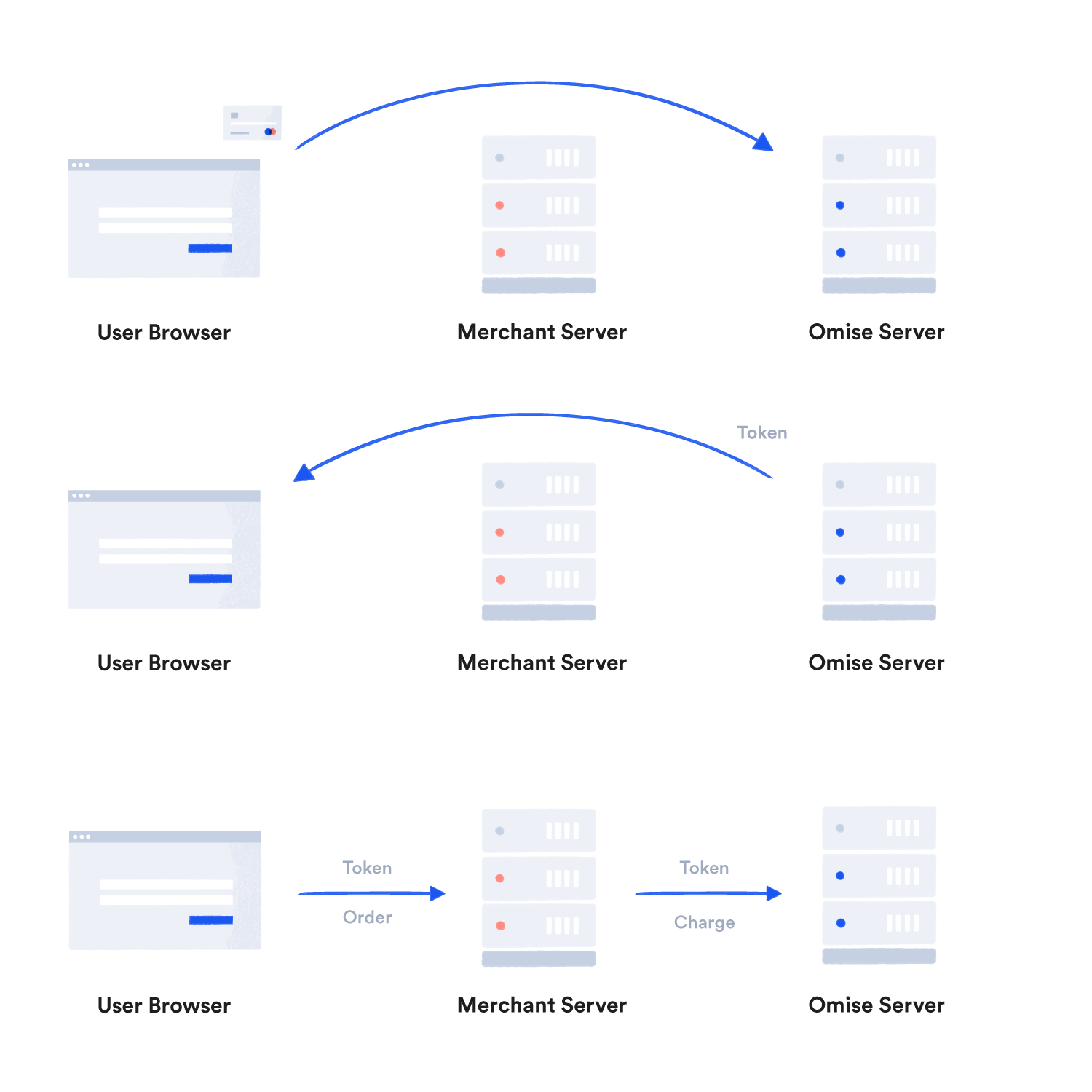
The only exception is for merchants who are themselves PCI DSS Certified Merchants. PCI DSS Certified Merchants are still required to notify us if they are planning to handle card details directly.
If you are collecting payments on a user's browser, use Omise.js and its pre-built payment form. If you are collecting payments on a user's mobile phone, use our iOS or Android SDKs. If you are using a plugin, do not modify its source code.
Avoid Accidentally Capturing Sensitive Card Details
You should take steps to avoid accidentally capturing sensitive card details.
When building payment forms, ensure that form parameters containing card details are not inadvertently sent to your server or captured in server logs.
Disable tracking on your checkout page. Analytics tools like Mixpanel and Google Analytics collect data on the page in which they are loaded, potentially including any sensitive details, and send that information to a third party.
Enable HTTPS on Your Website
HTTPS is required for your checkout page and highly recommended for your entire website.
Enabling HTTPS on your checkout page will protect your users' sensitive data, prevent account compromise, and inspire greater user confidence, which can lead to increased sales. Search engines rank HTTPS-enabled sites higher.
Transport Layer Security (TLS) is the successor to SSL. You are required to use TLS (at least version 1.2) and supported ciphers to enable HTTPS on your web servers.
We recommend using Let's Encrypt for your certificates.
HTTPS is also required for your webhook endpoint URL, if enabled.
Supported TLS Ciphers
We support the following TLS ciphers:
ECDHE-ECDSA-AES128-GCM-SHA256ECDHE-RSA-AES128-GCM-SHA256ECDHE-ECDSA-AES128-SHA256ECDHE-RSA-AES128-SHA256ECDHE-ECDSA-AES256-GCM-SHA384ECDHE-RSA-AES256-GCM-SHA384ECDHE-ECDSA-AES256-SHA384ECDHE-RSA-AES256-SHA384
Other less secure TLS ciphers may not be supported.
Store and Transmit Secret Key Securely
Each account has a public and a secret key (see API Authentication). Your public key can only be used for limited, safe operations like tokenizing credit cards.
Your secret key, however, can be used to perform all other API operations, such as creating charges, refunds, transfers, and downloading customer information. You should therefore take the following steps to keep your secret key secure:
- Never commit your secret key on your code repository. Instead, use environment variables to store your secret key (see example documentation for Heroku)
- Never share accounts. To see if someone else accessed your account, check https://dashboard.omise.co/sessions
- Always use strong passwords and Two-Factor Authentication (2FA) on your dashboard, website, and any other e-commerce administrative backend you use.
If you find that your secret key has been compromised, you are required to login to your dashboard account and roll your keys as soon as possible.
It is recommended that you notify us about the compromise early so we can verify your account security.
Follow Recommendations for Minimizing Fraud
Our fraud protection system requires detailed transaction data to calculate the risk score for given transaction.
In addition to providing a payment form and a secure way to collect credit card details, Omise.js also collects extra information such as the user's client IP, browser agent, and browser history used by our fraud protection system.
For example, if the IP belongs to a server hosting provider, Tor network or public proxy, the chances of fraud are high, but if the IP belongs to an ADSL user matching the country of the card issuer, it is most likely a legitimate transaction.
To get the most benefit from our automated fraud protection, it is recommended to capture billing address details, especially for customers from the United States and Canada, and provide recommended parameters such as charge.ip, charge.description, and customer.email.
Supplying extra information about purchases (e.g. number of items, type of items, date of delivery) and customers (e.g. the customer's real IP address) feeds data into our fraud protection system which makes it more accurate.
Monitor Your Logs
Some types of business are prone to fraud (see our list of explicitly prohibited businesses).
For example, services like mobile top-up allow cash value to be extracted by a malicious actor before refunds or voids can occur.
If some aspect of your business falls into this category, we advise you keep a close eye to your logs for risky or fraudulent transactions.
Login to your dashboard and click on Logs
.
Stay Updated
Security threats are constantly evolving, and so are we. We regularly release new versions of our libraries to eliminate bugs or potential vulnerabilities.
Keep your software updated, and check this page for up-to-date recommendations for securely accepting payments online.
