Multi-currency
Topics covered on this page
Charge credit and debit cards in a currency other than your account funding currency using Multi-currency. Omise transparently converts the amount into your account funding currency (settlement currency), allowing cardholders to pay in their preferred currency (presentment currency).
How to enable
- Supported countries: Thailand, Singapore
- Minimum API version:
2014-07-27
To enable Multi-currency, email support@omise.co to request this feature. You will need to review and accept new terms and conditions.
Important notes
- This feature only supports credit and debit card charges; alternative payment methods (e.g., Internet Banking) are not supported.
- This feature only supports Visa and Mastercard brand cards.
- In certain circumstances, the cardholder may be charged a foreign transaction fee by their issuing bank even if they pay in their native currency.
Foreign exchange rate considerations
When charging in a non-native currency (a currency different from your settlement currency), cardholders will be subject to the foreign exchange rate determined by their card issuer. This issuer FX rate is often higher than the rate Omise applies at the time of the charge and is not controlled by Omise.
Important: In high-value transactions, FX discrepancies between the Omise rate and the card issuer rate can result in differences of 2,000–3,000 THB or more. To avoid customer confusion and potential disputes, charge in the local currency whenever possible.
Supported currencies
Supported currencies depend on the country in which your account is registered.
| Currency | Name | Thailand | Singapore |
|---|---|---|---|
| AUD | Australian Dollar | ✓ | ✓ |
| CAD | Canadian Dollar | ✓ | |
| CHF | Swiss Franc | ✓ | ✓ |
| CNY | Yuan Renminbi (Chinese Yuan) | ✓ | ✓ |
| DKK | Danish Krone | ✓ | |
| EUR | Euro | ✓ | ✓ |
| GBP | Pound Sterling (British Pound) | ✓ | ✓ |
| HKD | Hong Kong Dollar | ✓ | ✓ |
| JPY | Japanese Yen | ✓ | ✓ |
| MYR | Malaysian Ringgit | ✓ | |
| SGD | Singapore Dollar | ✓ | ✓† |
| THB | Thai Baht | ✓† | ✓ |
| USD | United States Dollar | ✓ | ✓ |
† Account funding currency
Malaysia and Japan aren't in this table because Multi-currency isn't available there at all. Merchants registered in those countries settle exclusively in their own local currency (MYR or JPY) and can't enable this feature on their account.
JPY is a zero-decimal currency. Unlike two-decimal currencies such as USD or THB, JPY amounts are not multiplied by 100 in API requests. A ¥1,000 charge is sent as amount=1000, not amount=100000. Sending a JPY amount using the same ×100 convention as other currencies will overcharge by a factor of 100.
Implementation
Let's walk through the steps to create a charge for USD 1,000 using an account registered in Thailand.
Creating a multi-currency charge is similar to creating a standard charge:
- Create a token
- Create a charge using the token identifier created in Step 1, specifying a
currencyother than your account funding currency.
Creating a token
To create a token, follow the instructions in the Omise.js guide. Follow the examples listed here for testing. For a simple payment form, insert the following into your checkout page:
<form id="checkout-form" method="POST" action="/checkout">
  <script type="text/javascript" src="https://cdn.omise.co/omise.js"
          data-key="OMISE_PUBLIC_KEY"
          data-amount="100000"
          data-currency="USD">
  </script>
</form>
Creating a multi-currency charge
Using the token created in the previous step, create a charge API request. Check the resulting charge object for the following attributes:
currency: the currency in which the charge was created (USD
)funding_currency: account funding currency (THB
)funding_amount: charge amount after exchange into your account funding currency
Except for amount and refunded_amount, all amounts are specified in the account funding currency.
curl https://api.omise.co/charges \
  -X POST \
  -u $OMISE_SECRET_KEY: \
  -d "amount=100000" \
  -d "currency=USD" \
  -d "card=$TOKEN_ID"
Response:
{
  "object": "charge",
  "id": "chrg_test_example00000001",
  "location": "/charges/chrg_test_example00000001",
  "amount": 100000,
  "net": 3174670,
  "fee": 120585,
  "fee_vat": 8441,
  "interest": 0,
  "interest_vat": 0,
  "funding_amount": 3303696,
  "refunded_amount": 0,
  "transaction_fees": {
    "fee_flat": "0.0",
    "fee_rate": "3.65",
    "vat_rate": "7.0"
  },
  "platform_fee": {
    "fixed": null,
    "amount": null,
    "percentage": null
  },
  "currency": "USD",
  "funding_currency": "THB",
  "ip": null,
  "refunds": {
    "object": "list",
    "data": [],
    "limit": 20,
    "offset": 0,
    "total": 0,
    "location": "/charges/chrg_test_example00000001/refunds",
    "order": "chronological",
    "from": "1970-01-01T00:00:00Z",
    "to": "2023-04-26T04:22:24Z"
  },
  "link": null,
  "description": null,
  "metadata": {},
  "card": {
    "object": "card",
    "id": "card_test_example00000001",
    "livemode": false,
    "location": null,
    "deleted": false,
    "street1": null,
    "street2": null,
    "city": "Bangkok",
    "state": null,
    "phone_number": null,
    "postal_code": "10320",
    "country": "us",
    "financing": "credit",
    "bank": "EXAMPLE BANK N.A.",
    "brand": "Visa",
    "fingerprint": "AAAAAAAAAAAAAAAAAAAAAAAAAAAAAAAAAAAAAAAAAAA=",
    "first_digits": null,
    "last_digits": "4242",
    "name": "John Doe",
    "expiration_month": 9,
    "expiration_year": 2024,
    "security_code_check": true,
    "tokenization_method": null,
    "created_at": "2023-04-26T04:22:22Z"
  },
  "source": null,
  "schedule": null,
  "customer": null,
  "dispute": null,
  "transaction": "trxn_test_example00000001",
  "failure_code": null,
  "failure_message": null,
  "status": "successful",
  "authorize_uri": null,
  "return_uri": null,
  "created_at": "2023-04-26T04:22:23Z",
  "paid_at": "2023-04-26T04:22:23Z",
  "expires_at": "2023-05-03T04:22:23Z",
  "expired_at": null,
  "reversed_at": null,
  "zero_interest_installments": true,
  "branch": null,
  "terminal": null,
  "device": null,
  "authorized": true,
  "capturable": false,
  "capture": true,
  "disputable": true,
  "livemode": false,
  "refundable": true,
  "reversed": false,
  "reversible": false,
  "voided": false,
  "paid": true,
  "expired": false
}
Exchange rates
For multi-currency charges, the amount specified in the original charge is transparently exchanged into your account funding currency at approximately 2-4% above the daily mid-market rate. Request the Forex API to see the exchange rate that Omise uses.
Since minimum and maximum amounts for a charge are set in your account funding currency, the effective minimum and maximum amounts for a multi-currency charge will vary depending on the current exchange rate.
For a two-step charge flow (authorize, then capture separately), the exchange rate is locked in at authorization — not at capture. The funding_amount set when the charge is authorized doesn't change when you later capture it, even if the exchange rate has moved in the meantime.
curl https://api.omise.co/forex/usd \
  -u $OMISE_SECRET_KEY:
Response:
{
  "object": "forex",
  "rate": 33.036961874999996,
  "location": "/forex/usd",
  "livemode": false,
  "base": "USD",
  "quote": "THB"
}
Processing international cards
Multi-currency and international cards are technically different features — one is about the currency you charge in, the other is about where the card was issued. But in practice they overlap heavily: if a customer is paying you in their own currency instead of your settlement currency, their card is very likely issued in a different country too. So if you've enabled Multi-currency, the following AVS guidance is worth implementing as well, even though it's not part of the Multi-currency feature itself.
Improving authorization rates with AVS
When planning to accept multi-currency payments, also consider implementing Address Verification Service (AVS) on your credit card form. AVS significantly improves authorization success rates for international cardholders, especially from the United States, United Kingdom, and Canada — see How can I improve my authorization rate for US, UK, and Canadian cardholders? for implementation details.
Refunds
Create a full or partial refund for a multi-currency charge using the Refund API or the dashboard. The exchange rate used is the rate at the time you create the refund, which can differ from the original charge's rate if time has passed between the two. The refund itself is processed in the original charge currency, so you only need to supply the amount.
curl https://api.omise.co/charges/$CHARGE_ID/refunds \
  -X POST \
  -u $OMISE_SECRET_KEY: \
  -d "amount=100000"
Response:
{
  "object": "refund",
  "id": "rfnd_test_example00000001",
  "location": "/charges/chrg_test_example00000001/refunds/rfnd_test_example00000001",
  "livemode": false,
  "voided": true,
  "currency": "USD",
  "amount": 100000,
  "metadata": {},
  "charge": "chrg_test_example00000001",
  "terminal": null,
  "transaction": "trxn_test_example00000002",
  "status": "closed",
  "funding_amount": 3303696,
  "funding_currency": "THB",
  "created_at": "2023-04-26T04:22:25Z"
}
Dashboard
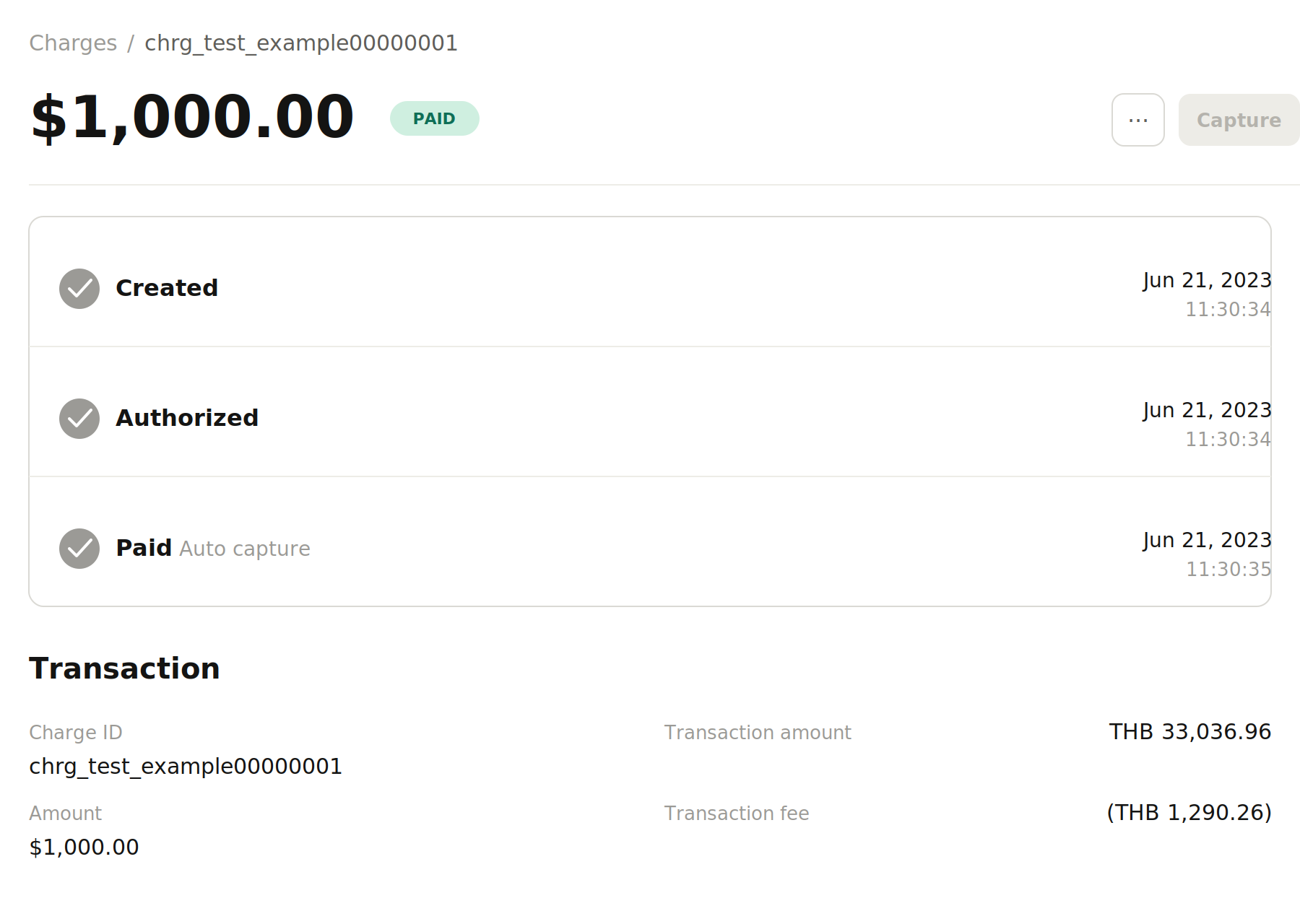
See the multi-currency charge details on your account dashboard:
Troubleshooting
Common issues and solutions
Charge fails with the failed_multi_currency error
Problem: Your multi-currency charge request returns a failed_multi_currency error.
Solution: This error indicates that multi-currency is not enabled on your account. Contact support@omise.co to enable this feature — see How to Enable. See failed_multi_currency in the API errors reference.
Charge fails with the invalid_charge error
Problem: Your charge request fails with an invalid_charge error when specifying a currency.
Solution: The currency you specified is not supported for your account's registered country. Check the Supported Currencies table to verify which currencies are available for your account location. See invalid_charge in the API errors reference.
Customer reports higher charge amount than expected
Problem: A customer reports being charged more than the amount shown on your checkout page.
Root cause: the customer's card issuer applied its own foreign exchange rate on top of the amount you charged — see Foreign Exchange Rate Considerations for why this happens and how to reduce it.
Solution: - Inform customers upfront that the final amount may vary slightly due to their bank's exchange rate. - Whenever possible, charge in the customer's local currency to avoid FX discrepancies - For high-value transactions, consider displaying a disclaimer about potential currency conversion differences.
International card authorization failures
Problem: International cards have a high failure rate, especially from US, UK, or Canadian cardholders.
Solution: Implement Address Verification Service (AVS) on your payment form — see Improving Authorization Rates with AVS.
Refund amount differs from original charge
Problem: The refund amount in your settlement currency differs from the original charge funding amount.
Explanation: Refunds use the exchange rate when the refund is created, not the original charge rate. If exchange rates have fluctuated between the charge and refund, the funding amounts will differ.
Note: The customer receives the refund in the original charge currency (the amount they paid), so they are not affected by this exchange rate difference.
FAQ
General questions
What is multi-currency charging? Multi-currency charging allows you to charge customers in a currency different from your account's settlement currency. For example, a Thailand-based merchant (settled in THB) can charge customers in USD, EUR, GBP, or other supported currencies. Omise handles the currency conversion automatically.
Which countries support multi-currency? Thailand and Singapore only — see How to Enable.
Do I need special approval to use multi-currency? Yes — see How to Enable for how to request it.
Can I use multi-currency with any payment method? No. Only Visa and Mastercard credit and debit cards are supported; alternative payment methods like Internet Banking are not — see Important Notes.
Currency and exchange rates
How is the exchange rate determined? Approximately 2-4% above the daily mid-market rate — see Exchange rates. Check the current rate using the Forex API.
Why does my customer see a different amount on their card statement? See Customer Reports Higher Charge Amount Than Expected.
How much can exchange rate differences vary? See Foreign Exchange Rate Considerations.
Can I lock in an exchange rate for a specific time period? No. Exchange rates are dynamic and determined at the time of the transaction. Rates may change between authorization and settlement.
What exchange rate is used for refunds? The rate at the time the refund is created, not the original charge rate — see Refunds.
Fees and settlements
Are there additional fees for multi-currency charges?
Standard transaction fees apply, and the exchange rate already includes Omise's currency conversion margin. Check your transaction fees in the charge object's transaction_fees field.
What currency will I receive in my settlement? Always your account's funding currency, regardless of the charge currency. For example, a Thailand-registered account always settles in THB.
How do I know the converted amount before creating a charge? Use the Forex API to check the current exchange rate and multiply your charge amount by it. Rates may shift slightly between your check and the actual charge.
What are the minimum and maximum charge amounts for multi-currency? Set in your account funding currency, so the effective limit in another currency shifts with the exchange rate — see Currency and Amount.
Technical implementation
How do I create a multi-currency charge? See Implementation for step-by-step instructions.
Can I test multi-currency in test mode? Yes, using test card numbers and API keys as documented in Tokens API.
Which fields in the charge object show currency information?
- currency: the currency in which the charge was created (presentment currency)
- funding_currency: your account's settlement currency
- amount: charge amount in the presentment currency
- funding_amount: converted amount in your settlement currency
Do I need to modify my checkout form for multi-currency?
Only the data-currency parameter in your Omise.js script changes — the rest of the implementation stays the same.
Does multi-currency work with Charge Schedules or recurring charges? Yes. Multi-currency charges are supported through both.
International cards
What's the difference between multi-currency and international cards? Multi-currency refers to charging in different currencies (e.g., charging USD on a Thailand account). International cards refer to cards issued in a different country than your merchant account. They're different concepts that often occur together in practice.
Why do international card authorizations fail more often? International transactions face additional verification requirements from card issuers, and many failures happen because billing address information is missing or incorrect — see Improving Authorization Rates with AVS.
Will customers be charged foreign transaction fees? Possibly, even when charging in the customer's native currency, if their card issuer applies one for cross-border merchants. The card issuer's policies determine whether this fee applies, not Omise.
Refunds and disputes
How do I refund a multi-currency charge? See Refunds. Specify the amount in the original charge currency.
Can I do partial refunds on multi-currency charges? Yes, the same way as with standard charges — specify the amount you want to refund in the original charge currency.
What happens if exchange rates change between charge and refund? The customer is unaffected, since they receive their refund in the original charge currency — but the converted amount in your settlement currency may differ from the original funding amount. See Refund Amount Differs from Original Charge.
How do disputes work with multi-currency charges? Omise handles disputes in the original charge currency. If you lose a dispute, Omise converts the debited amount to your settlement currency using the exchange rate at the time of dispute resolution.
